
Fixed Asset Reconciliation: Resolve Inventory Variances
Fixed Asset Reconciliation: How Finance and Operations Resolve Inventory Variances
What Is Fixed Asset Reconciliation?
Fixed asset reconciliation compares physical inventory results with accounting records to identify missing, duplicated, unregistered, or incorrectly classified assets.
The process connects two views of the same organization. Finance maintains records that support reporting and control. Operations knows how assets are used, moved, and assigned. Field inventory shows what exists at a specific location and condition. Reconciliation brings these views together.
A reconciliation exercise does not mean that every difference signals fraud or accounting error. Differences may result from transfers, timing gaps, changes in descriptions, disposal delays, or incomplete handover documents. The objective is to identify the difference, understand its cause, document the evidence, and assign the right action.
Why Physical Counts and Accounting Records Diverge
Organizations often update financial records and physical operations at different times. A purchase may be recorded before delivery. An asset may move before the location changes in the system. A replacement may be installed while the original remains on the register.
Common causes include:
- Separate spreadsheets used by finance and operations.
- Inconsistent asset descriptions.
- Unrecorded transfers between departments or sites.
- Assets received without complete documentation.
- Delayed disposal or retirement updates.
- Duplicate records created during system migration.
- Incorrect tag numbers or serial numbers.
- Assets grouped financially but counted individually in the field.
- Construction or pre-opening assets not fully handed over.
Therefore, reconciliation requires context. A simple comparison of names and numbers may produce false exceptions. The team should compare identifiers, locations, asset classes, images, quantities, and source evidence.
The Most Common Inventory Variances
1. Missing assets
The accounting record exists, but the field team cannot locate the asset. The next step may involve a second search, a transfer review, a custodian interview, or an investigation of disposal records.
2. Unregistered assets
The field team finds an asset that does not appear in the accounting extract. It may be a recent purchase, an inherited asset, a project handover item, or an item recorded under another description.
3. Duplicate records
Two records may describe the same physical asset. Duplicate records can distort asset counts and create confusion during depreciation or disposal decisions.
4. Wrong locations
The asset exists, but its recorded location does not match the field result. This issue affects accountability and makes future verification slower.
5. Incorrect classifications
An asset may appear under the wrong category, department, or operational function. Classification affects reporting, analysis, and sometimes the appropriate review workflow.
6. Retired assets still on the register
An asset may have left service while the record remains active. The organization should review the retirement evidence and follow its approved finance process.
7. Quantity differences
The record may show one quantity while the field team finds several units, or the reverse. The team should establish whether the record represents a single asset, a group, or a component structure.
A Five-Step Reconciliation Workflow
Step 1: Agree the scope and data sources
Define the sites, departments, asset classes, date of the accounting extract, and fieldwork period. Then list the source files that will support the comparison.
The timing matters. A field count performed months after the accounting extract may create avoidable differences. If the dates cannot match, record the timing gap and apply a clear cut-off rule.
Step 2: Standardize the comparison fields
Create a common structure for asset ID, tag number, description, location, department, custodian, serial number, and status. Standardization improves matching when the two datasets use different wording.
For example, “Split AC Unit,” “Air Conditioner,” and “AC-01” may refer to the same class. The team should not merge records based on a description alone. It should use additional evidence.
Step 3: Match the records
Use a defined matching hierarchy. An exact tag or serial number may provide a strong match. Location and image evidence can support a match when tags are missing. Description and model information may help identify possible matches.
Classify the result as Matched, Possible Match, Field Only, Register Only, Duplicate, or Requires Review. This classification separates confirmed results from assumptions.
Step 4: Investigate and assign exceptions
Each exception should have an owner and next action. Finance may review a register-only item. Operations may search for a missing asset. Procurement may provide delivery documents. Engineering may confirm a replacement.
Add an evidence field and a target resolution date. This transforms a static variance report into a management workflow.
Step 5: Approve and update through controlled processes
The final action depends on the organization’s policies. It may include correcting a location, creating a record, linking a duplicate, recording a transfer, or initiating an approved disposal review.
Do not overwrite evidence. Keep the original field result, decision, reviewer, and date. A clear audit trail helps future teams understand why a record changed.
How to Classify and Prioritize Variances
Not every exception carries the same risk. A practical priority model can consider:
| Priority | Typical condition | Suggested response |
| High | High-value asset missing or unidentified | Immediate owner assignment and management review |
| High | Repeated variance across several sites | Root-cause analysis and control review |
| Medium | Wrong location or custodian | Confirm the current location and update the record |
| Medium | Unregistered operational asset | Review source documents and create or link the record |
| Low | Minor description inconsistency | Apply the naming standard during the next controlled update |
The exact thresholds should follow the client’s materiality, risk, and operating policies. DOIT’s role is to provide reliable field evidence and structured findings. The client’s authorized finance and management teams make the accounting or policy decision.
What Finance Needs from the Field Team
Finance needs more than a spreadsheet of “found” and “not found.” A useful field output should include:
- Asset identifier and tag number.
- Physical location and department.
- Description and classification.
- Serial number or model when available.
- Condition at the time of verification.
- Image reference when required.
- Match status.
- Variance type.
- Evidence or field note.
- Recommended next action.
- Responsible reviewer.
This structure helps finance decide which items require a record update, a transfer review, a disposal review, or additional investigation.
Preparing Reconciled Data for the Client’s Existing ERP or Accounting System
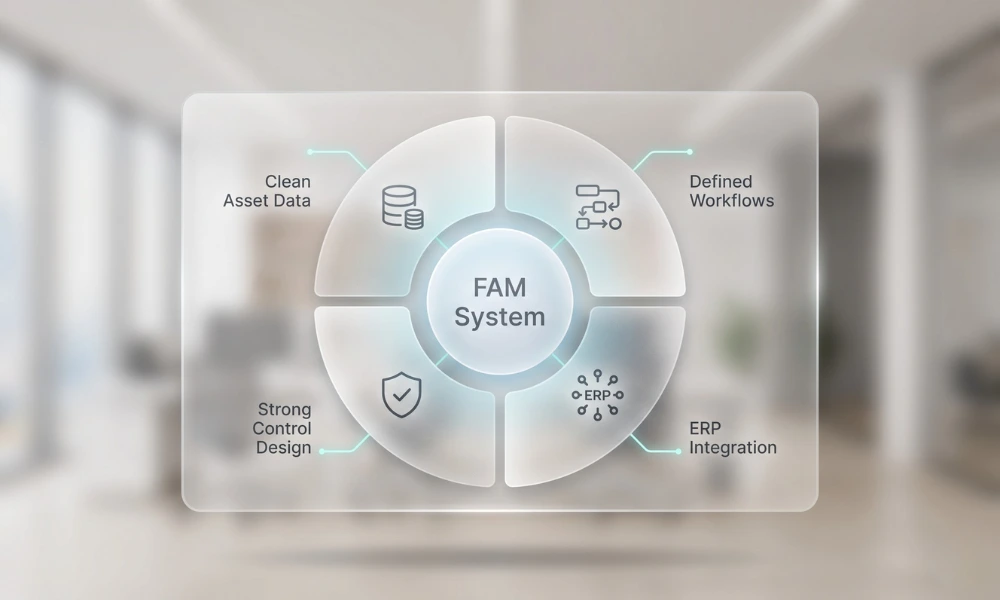
DOIT can structure verified field data for review and onward use in a client’s existing ERP or accounting environment. The integration or import format should be agreed before delivery.
That agreement may define:
- Required field names.
- Allowed asset classes.
- Location and department codes.
- Unique identifier rules.
- Import file structure.
- Review and approval steps.
- Treatment of unresolved exceptions.
DOIT does not replace the client’s ERP or decide the client’s accounting treatment. Instead, DOIT helps close the information gap between the physical site and the approved system of record.
Reconciliation Report Structure
A management-ready report can contain four sections:
- Scope and method: Sites, dates, asset classes, and sources used.
- Confirmed matches: Records supported by physical evidence.
- Exceptions: Missing, field-only, duplicate, location, classification, and condition issues.
- Actions: Owner, evidence, due date, status, and approval notes.
A summary dashboard can show total records reviewed, match rate, exception count, high-priority items, and unresolved actions. However, the dashboard should link back to detailed evidence.
How DOIT Supports Field Verification and Data Structuring
DOIT supports finance and operations teams through scope assessment, inventory-zone planning, on-site verification, photography, tagging, data standardization, reconciliation analysis, and structured reporting.
The resulting output can help the client review its asset register, improve location visibility, prepare for an audit, and feed approved data into an existing ERP or accounting system according to project requirements.
Conclusion
Fixed asset reconciliation is the control step that turns an inventory count into useful management information. It explains why the physical reality differs from the records and gives responsible teams a path to resolution.
When finance, operations, and field teams use common identifiers and documented evidence, the organization can improve data accuracy without relying on assumptions. The result is a more reliable asset register and a clearer basis for financial and operational decisions.
Need to understand your inventory variances? Request a Fixed Asset Reconciliation Scope Review from DOIT.
Category
Recent Posts

Hotel Pre-Opening Asset Inventory: Audit-Ready Register